updated 2026-11-26·1 min read
Backlinks
Inspect incoming linked mentions, convert unlinked plain-text mentions into wikilinks, drag embeds, and rename notes with automatic link updates.
See every [[Wikilink]] and plain-text mention pointing to your current note across the vault.
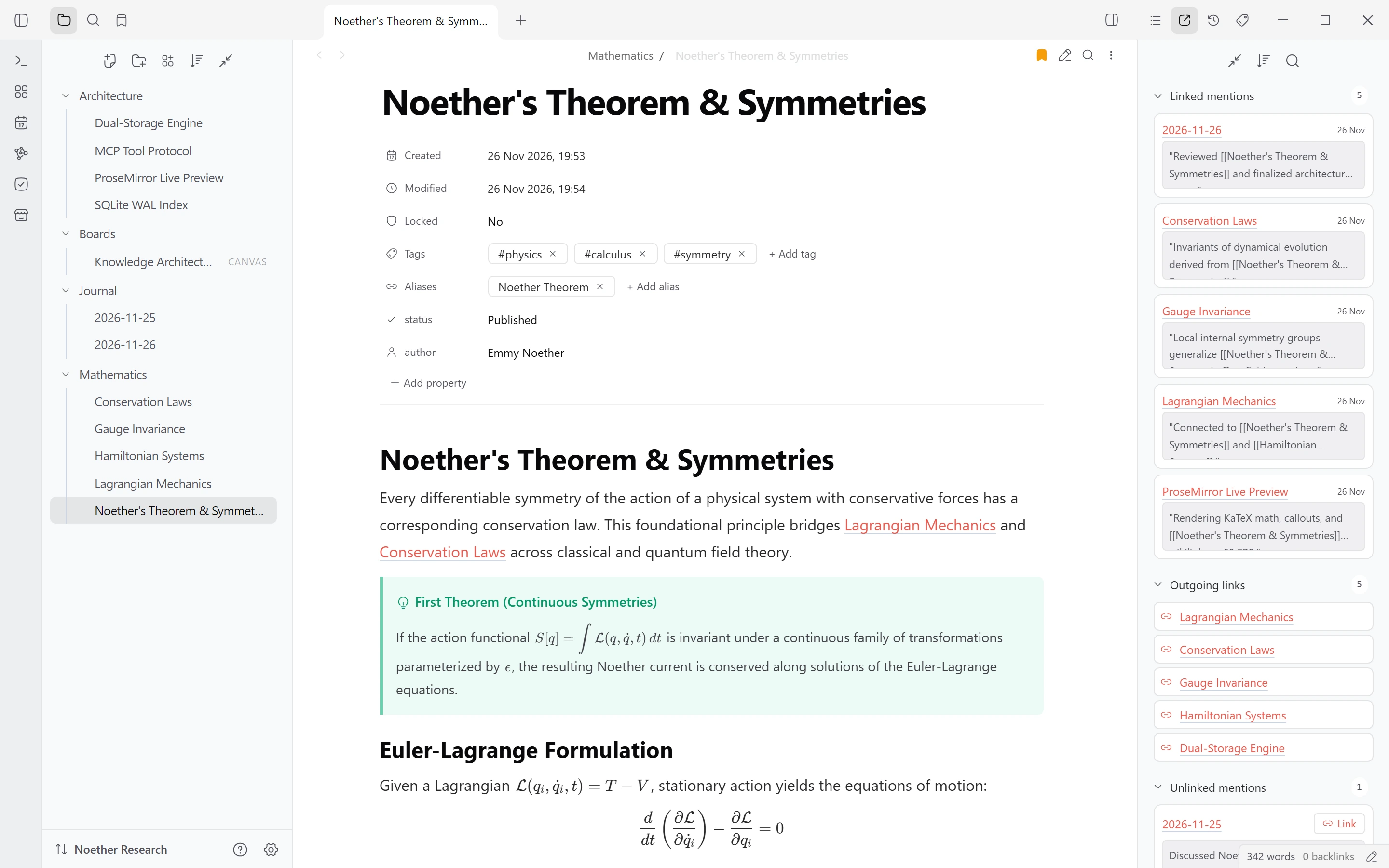
Linked & Unlinked Mentions
Click the backlinks icon in the right sidebar rail (or press Ctrl+Alt+\ to toggle the right sidebar, and use the ... document menu → Backlinks):
- Linked Mentions: Notes containing an explicit
[[Wikilink]]to the active document. - Unlinked Mentions: Notes that mention the active note’s title or aliases in plain text. Click Link on any preview to turn it into a real wikilink.
- Outgoing Links: Every link leaving the active note.
Vault-Wide Renaming & Drag Linking
Rename a note in Noether and every incoming wikilink across your vault updates with it, so links don’t rot.
You can also drag any item from the Backlinks pane straight into the editor to insert [[Note]], or hold Shift while dragging to insert an embed (![[Note]]).