updated 2026-11-26·2 min read
Tasks
Aggregate - [ ] checklist items across your vault into the Tasks Center with All, Pending, and Completed filters, search, and two-way disk sync.
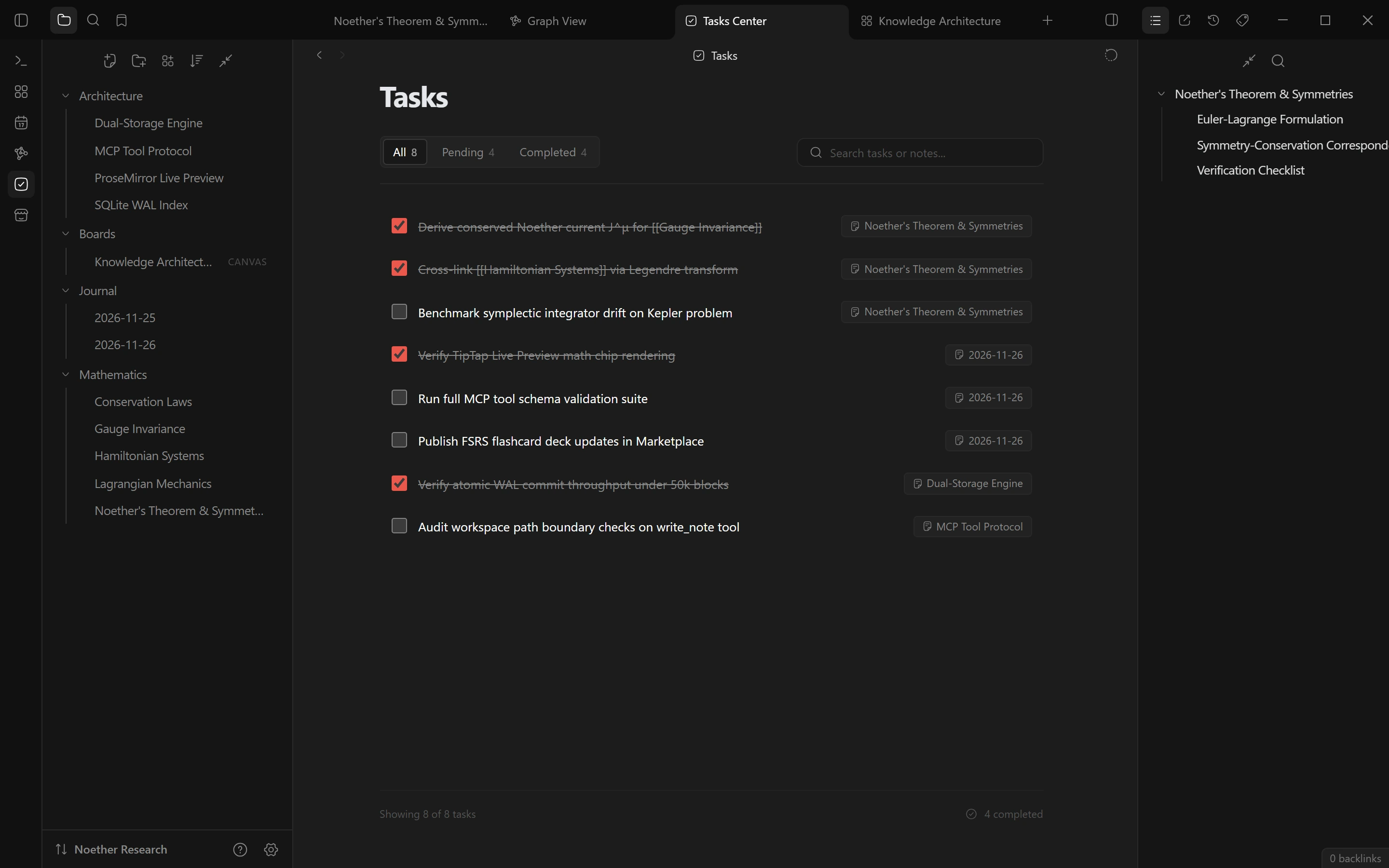
Pull every - [ ] checklist item across your vault into the Tasks Center with two-way file sync. Checking off an item updates the .md file on disk, and editing the file refreshes the list.
Writing Tasks in Notes
Use standard Markdown checklist syntax anywhere in any note:
- [ ] Draft migration plan #work
- [ ] Review quarterly project notes #work
- [x] Merge pull request
Click any checkbox in Live Preview or the Tasks Center to toggle its completion state.
The Tasks Center (Ctrl+Shift+T)
Press Ctrl+Shift+T or click the checklist icon in the Action Rail:
- Status Filters & Search: Switch between All, Pending, and Completed pills (with live counts), or search across task text and source note titles.
- Two-Way File Sync: Checking off a task in the Tasks Center immediately updates the underlying
.mdfile on disk, and editing the note refreshes the view. - Jump to Source: Click any task’s source-note badge to open that note in the editor.