updated 2026-11-26·5 min read
Keyboard Shortcuts & Commands
Universal Command Palette (Ctrl+K), omnibox search prefixes, stateful command verbs, file tree, tabs, editor, PDF, lightbox, and hotkey remapping.
A dense wall-of-text command palette slows you down when you’re just trying to split a pane or toggle a sidebar. Noether groups commands clearly and lets you open files, switch vaults, format Markdown, and run extensions straight from the keyboard.
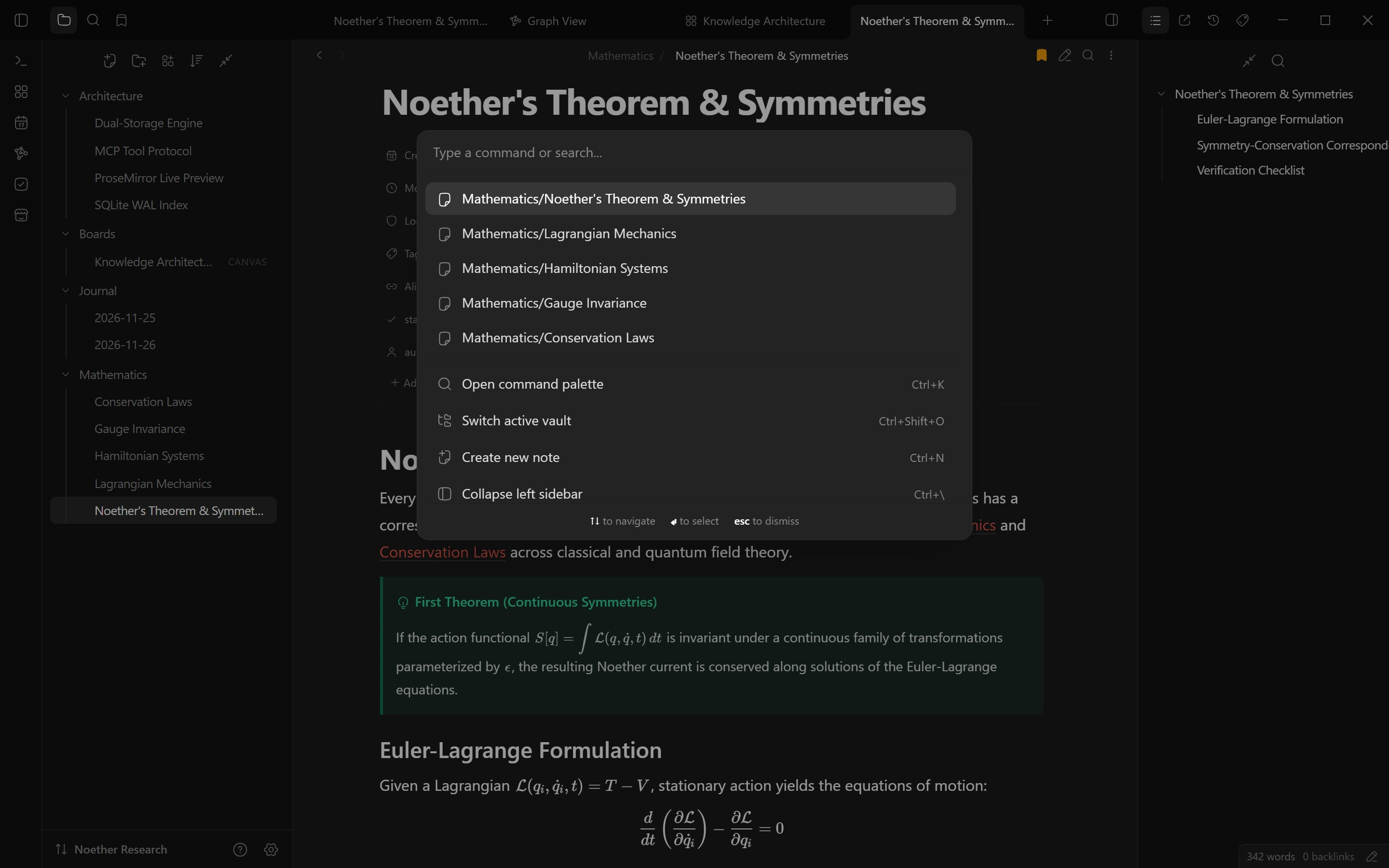
Universal Command Palette (Ctrl+K / Ctrl+P)
Ctrl+P (Cmd+P on macOS) opens the Command Palette anywhere in Noether, including while typing inside a Markdown note. Ctrl+K (Cmd+K) opens the Command Palette everywhere outside the editor, and inserts a Markdown link ([text](url)) when your cursor is inside TipTap:
- Recent Notes: Opening with an empty input surfaces your 5 most recently modified notes.
- Instant Full-Text Search: Match note titles, folder paths, or body text with excerpt previews.
- Actionable Stateful Verbs: Commands update dynamically to reflect current workspace state (e.g.
Collapse left sidebarvsExpand left sidebar,Switch to reading viewvsSwitch to editing view,Close split editor panevsSplit editor pane), while retainingtogglesearch aliases. - Context-Aware Editor Actions: All
/commands appear under theEditorsection and softly dim when no Markdown editor is active.
Omnibox Search Prefixes
Type a prefix in the Command Palette (Ctrl+K / Ctrl+P) to narrow results immediately:
| Prefix | Filter Scope | Example |
|---|---|---|
task: or tasks: | Vault-wide checklist items with completion badges | task: deploy |
bm: or bookmark: | Bookmarked notes and documents | bm: roadmap |
tag: or # | Tagged notes with note counts | #research or tag: physics |
canvas: | Infinite spatial canvas boards (.canvas) | canvas: architecture |
Global, Sidebar & Window Controls
| Action | Windows / Linux | macOS |
|---|---|---|
| Command Palette / Quick Open | Ctrl+P (anywhere) or Ctrl+K (outside editor) | Cmd+P or Cmd+K |
| Open Settings / Open Help | Ctrl+, / F1 or Ctrl+/ | Cmd+, / F1 or Cmd+/ |
| Switch Active Vault | Ctrl+Shift+O | Cmd+Shift+O |
| Sidebar Title Search / Files | Ctrl+Shift+F / Ctrl+Shift+E | Cmd+Shift+F / Cmd+Shift+E |
| Toggle Left / Right Sidebar | Ctrl+\ / Ctrl+Alt+\ | Cmd+\ / Cmd+Alt+\ |
| Split Editor Pane | Ctrl+Alt+S (or Command Palette) | Cmd+Alt+S (or Command Palette) |
| Reading View / Source Mode | Ctrl+E / Ctrl+Alt+S | Cmd+E / Cmd+Alt+S |
| Zoom In / Out / Reset (100%) | Ctrl+= / Ctrl+- / Ctrl+0 | Cmd+= / Cmd+- / Cmd+0 |
| Fullscreen / Reload Window | F11 / Ctrl+R | F11 / Cmd+R |
Navigation, File Tree & Tabs
| Action | Windows / Linux | macOS |
|---|---|---|
| New Note / Duplicate Note | Ctrl+N / Ctrl+D | Cmd+N / Cmd+D |
| New Canvas | Ctrl+Shift+C or Ctrl+Shift+N | Cmd+Shift+C or Cmd+Shift+N |
| New Tab / Close Tab | Ctrl+T / Ctrl+W | Cmd+T / Cmd+W |
| Next / Previous Tab | Ctrl+Tab (Alt+E) / Ctrl+Shift+Tab (Alt+Q) | Ctrl+Tab / Ctrl+Shift+Tab |
| Jump to Tab 1..8 / Last Tab | Ctrl+1..8 / Ctrl+9 | Cmd+1..8 / Cmd+9 |
| Back / Forward in History | Alt+← / Alt+→ | Cmd+[ / Cmd+] |
| Undo / Redo File Action | Ctrl+Alt+Z / Ctrl+Alt+Y | Cmd+Alt+Z / Cmd+Alt+Y |
| File Tree Copy / Cut / Paste | Ctrl+C / Ctrl+X / Ctrl+V | Cmd+C / Cmd+X / Cmd+V |
| Rename / Trash Item | F2 / Delete | F2 or Enter / Backspace |
| Tree Arrows / Bounds / Select | ← → / Home End / Shift+↑↓ | ← → / Home End / Shift+↑↓ |
Editing, Lightbox & PDF Controls
Editor Formatting, Lightbox & PDF Shortcuts
Editing & In-Note Search
- Find / Replace:
Ctrl+F/Ctrl+H(Cmd+F/Cmd+H) - Live Preview / Source Mode:
Ctrl+Alt+S - Bold / Italic / Strikethrough / Highlight:
Ctrl+B/Ctrl+I/Ctrl+Shift+X(orCtrl+Shift+S) /Ctrl+Shift+H - Markdown Link / Math Chip:
Ctrl+K/Ctrl+Shift+4(orCtrl+$) - Headings 1..6 / Paragraph:
Ctrl+Alt+1..6/Ctrl+Alt+0 - Lists & Blocks: Type
-,1.,- [ ],>, or use the/slash menu
Image Lightbox & PDF Presentation
- Image Lightbox: Click image to open;
Ctrl+Scroll/pinch/+/-to zoom up to 25x;0to reset; double-click1x/2x; arrows (Shift+Arrows100px) to pan;Escto close. - PDF Presentation:
F5to enter;Escto exit;→/Space/PageDownnext;←/PageUpprev;+/-/0zoom;Ctrl+0fit width;Ctrl+]/Ctrl+[rotate 90 deg CW / CCW.
Extension Shortcuts & Hotkey Customization
| Extension | Shortcut | Action |
|---|---|---|
| Knowledge Graph | Ctrl+G | Open global 2D knowledge graph |
| Daily Journal | Ctrl+Shift+D | Open or create today’s daily note |
| Tasks Center | Ctrl+Shift+T | Open vault-wide tasks list |
| Bookmarks | Ctrl+Shift+B | Open Bookmarks sidebar tab (or toggle bookmark in Command Palette) |
| Version History | Ctrl+Shift+H | Open Version History sidebar tab (outside editor) |
| FSRS Review (Official Ext.) | Ctrl+Shift+R | Open due flashcards review |
All hotkeys can be remapped in Settings (Ctrl+,) → Hotkeys, or searched globally using Deep Settings Search (press Esc to clear the search query, or click Reset all to restore defaults).